Computers can store vast amounts of data. And lots of programs exist to find things in that data. For instance, if we have a dictionary of the million-plus words in English we might want to be able to check whether a given word is in the dictionary. At a much smaller scale, if we manage or our todo list with a computer program, that program might need to be able to find the item that is due soonest.
Both of these are examples of search algorithms. In both cases there is some set of data—all the words in our dictionary or the items in or todo list—and we want the program to find a particular item or tell us that it’s not present.
In this chapter we will cover two of the most important kinds of search algorithms: linear (or sequential) and binary. For the AP CSA exam you will need to be able to implement linear searches (good news, we already learned how to do that back in Subsection 6.3.3 Searching) and to analyze the behavior of linear and binary searches.
The following video is also on YouTube at https://youtu.be/DHLCXXX1OtE. It introduces the concept of searching including sequential search and binary search.
Linear or sequential search can be used to find a value in unsorted data. It usually starts at the first element and walks through the array or ArrayList until it finds the value it is looking for and returns either the value itself or sometimes its index. If it reaches the end of the array or list without finding the value, it needs to somehow indicate that the item was not found, such as by returning a distinguished value like null or -1. Click on Show CodeLens below to see linear search in action.
The code for sequentialSearch for arrays below is from a previous AP CSA course description. Click on the Code Lens button to see this code running in the Java visualizer.
Here is the same search with an ArrayList. The same algorithms can be used with arrays or ArrayLists, but notice that size() and get(i) are used with ArrayLists instead of length and [i] which are used in arrays. Many of our examples will use arrays for simplicity since with arrays, we know how many items we have and the size won’t change during run time. There are methods such as contains that can be used with ArrayList instead of writing your own algorithms. However, they are not in the AP CSA Java subset.
Here is a linear search using ArrayLists. Notice that size() and get(i) is used with ArrayLists instead of length and [i] which are used with arrays. Click on the Code Lens button to step through this code in the visualizer.
This would be true for the shortest execution. This would only take one execution of the loop.
The value is in the middle of the array
Why would this be the longest execution?
The value is the last one in the array
There is one case that will take longer.
The value isn’t in the array
A sequential search loops through the elements of an array or list starting with the first and ending with the last and returns from the loop as soon as it finds the passed value. It has to check every value in the array when the value it is looking for is not in the array.
We can also look for a String in an array or list, but we need to remember to use equals rather than ==. Remember that == is only true when the two references refer to the same String object, while equals returns true if the characters in the two String objects are the same.
We can also apply the linear search algorithm to data in a 2D array. There are two ways to think about this, which makes sense since there are two dimensions.
One way is if we think of the 2D array as a grid of individual values and we are searching for one specific value. For instance, if the grid represented a chess board and we were searching for the position of the black queen, we could loop over all the row of the 2D array and and then loop through the values in each row, checking each position to see if it held black queen. We are essentially searching linearly through the rows and then again within each row.
The code below demonstrates this with a 2D array of integers. Click on the Code Lens button to step through this code. Then, change it to work with a 2D array of Strings. Remember to use the equals method to compare Strings.
What will the following code print? Click on the Code Lens button to step through this code. Can you change the code to work for a String 2D array instead of an int array? Note that the indices row and col will still be ints. Remember to use the equals method to compare Strings.
The other way to think about searching a 2D array is to think of the array as a table of data, such we might load from a CSV file as we discussed in Section 11.1 Files. When we have that kind of date, often what we’re searching for is a row within that table that matches some criteria. In this case we’d loop over the rows of the 2D array and then for each row test whether it matches our criteria. That could be as simple as checking whether some value at a given position in the row is a particular value. But it might also require us to do a linear search within the row such as if we’re looking for a row that contains a particular value in any position.
If we need to search through a list that is not in any particular order there’s nothing better to do than to look through the list one item at a time. We might get lucky and find the thing we’re looking for early in the list or it might be near the end. If we do a lot of linear searches for different values, on average we’ll have to look through half the list before we find what we’re looking for.
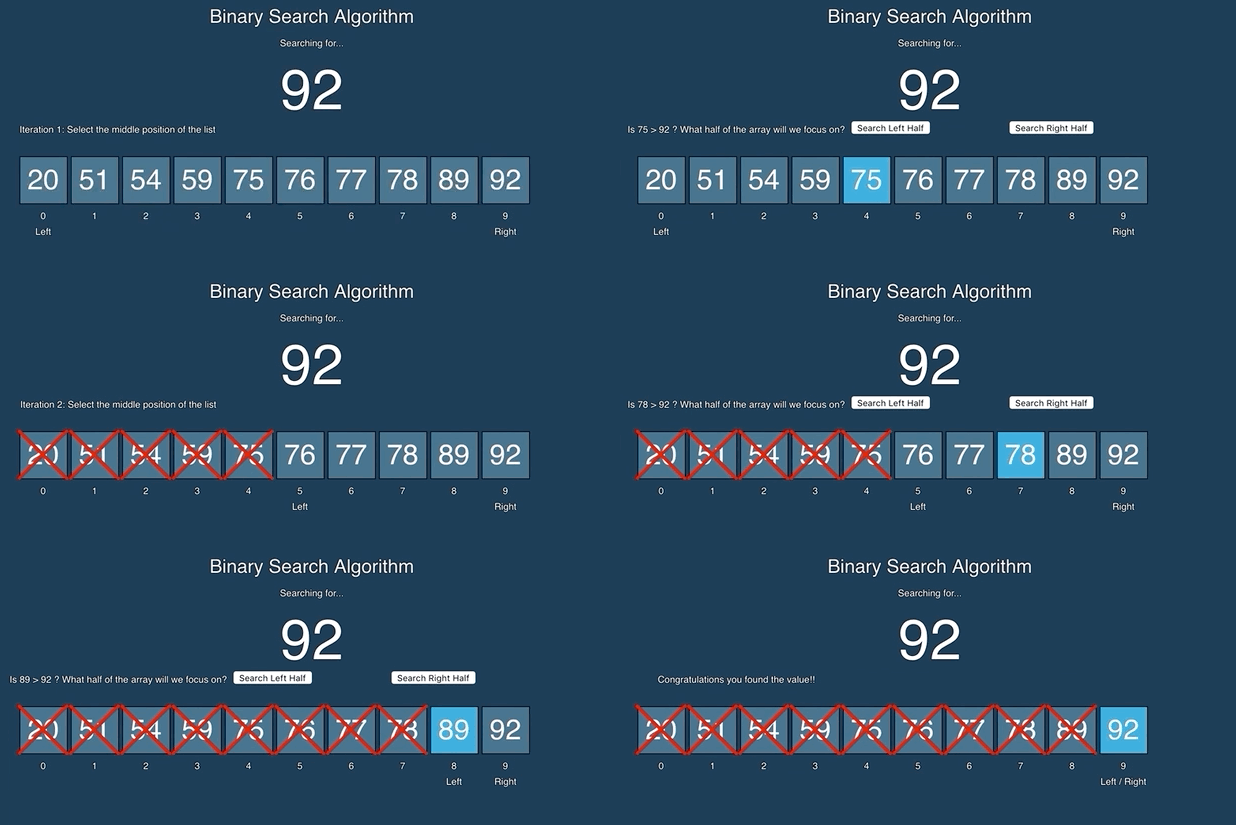
But things change if the list is sorted. If you’ve ever looked up a word in a physical dictionary you probably didn’t start on the first page and read all the words until you found the one you were looking for. Instead, you probably opened the dictionary to about the middle and then looked to see if the words on that page were before or after the word you were looking for, alphabetically. That told you which half of the dictionary your word was in.
You could then turn to the middle of that section (while keeping a finger in the first place you opened the dictionary). That would let you narrow down to which quarter of the dictionary the word is in. Then split that quarter in half to get to the right eighth, and so on. Even with a massive unabridged dictionary like the 2,662-page Webster’s Third New International Dictionary, this procedure will get us to the correct page in just eleven steps.
In code, binary search works by keeping track of a range we call the search space which is a range somewhere in the whole array or ArrayList. Initially the search space spans the whole array or list. Binary search then repeatedly divides the search space in half by comparing the value we are searching for to the value at the index in the middle of a search space and then updates the search space to be one half or the other of the current search space. Eventually it will either narrow down the search space down to one element which is either the value we are looking for, in which case we found it, or not, in which case it isn’t in the array or ArrayList at all.
Binary search can be surprisingly hard to implement correctly. Stanford computer science courses used to start by having everyone try to write a binary search algorithm and according to Stanford professor Donald Knuth, fewer than ten percent of students wrote a bug free implementation. Even the version of binary search in the Java standard library contained a bug for nine years before it was found in 2006!.
Luckily if you need to use a binary search you can probably use one that’s already been written and debugged, even if it did take them nine years to get out the last bug (we think). But if you do want to write one, the key is to keep track of what the current search space is and make sure that at every step the search space gets strictly smaller but also that you don’t shrink it too much.
Here’s an implementation of binary search that keeps track of the search space using a pair of variables low and high which represent a half-open interval, meaning the range of indexes from low (inclusive) to high (exclusive).
We can also use binary search with an array or ArrayList of other element types, as long as they have some ordering and the elements are sorted by it. For instance, we can use binary search on an array of String values using the compareTo method to compare values. Remember that the compareTo method compares to String values and returns a negative value if the current string is less than the other string, 0 if they are equivalent, and a positive value if the current string is greater than the other string.
At a high level, linear search and binary search are two different algorithms that solve the same problem. How do we choose between them? Sometimes the choice is easy: if our array or list is not sorted we pretty much have to use a linear search.
But suppose our data is sorted and we could use either. Should we always use a binary search? What does it mean when we say binary search is faster than linear search? Is that always true?
Computer scientists like to answer these questions by analyzing algorithms in terms of their run time which isn’t measured by running a program and timing it but rather by characterizing, slightly abstractly, how many steps the algorithm will have to execute before it finishes. In particular computer scientist think about the worst case run times of algorithms, meaning how many steps will the algorithm take if given the worst possible input.
With searching, the abstract step is something like, how many items does the algorithm have to compare to the thing it is searching for and the worst case is usually if the thing we are searching for isn’t there to be found.
A linear search, searching an array would have to look at every item in the array before it could say that the item wasn’t present. By contrast a binary search would only have to look at a handful of items before the search space would collapse and it could determine that the search had failed.
Finally, the thing computer scientists most often care about is not even how many steps an algorithm takes on any given input but how the worst case run time changes as the size of the problem changes. For searching it makes sense that it would take longer to search a bigger array or list. And indeed both linear and binary searches take longer, the more things they have to search. But we can actually compare how they change.
If we define run time of a search algorithm as the number of elements the algorithm has to compare to the target and the worst case run time occurring when the target isn’t present, then it’s easy to analyze linear search: the worst case run time is the size of the array being searched, because the algorithm has to look at every element of the array before it can be sure the target isn’t present.
Binary search on the other hand, doesn’t always need to look at every element. It only needs to look at the middle elements of ever-shrinking search spaces until the search space is just one element. After comparing the middle element of the array to the target, it will reduce the search space by half which means half of the elements will never be looked at. And half of the remaining half will be eliminated with one more comparison.
The table below shows how both the linear and binary search run times change. Notice how doubling the size of of the input n adds only one more comparison with binary search. So even though for a two-element array linear search and binary search take the same number of steps, because the number of steps increases so much slower as the size of the input grows we say that binary search is faster than linear search.
Run times can be described with mathematical functions that describe the rough mathematical relationship between the size of the input and the run time of the algorithm. For instance, since linear search’s run time grows by a constant amount with every increase in the input size, we can describe it with the function \(f(n) = n\text{.}\) As \(n\) (the input size) gets bigger, so does the run time. Because we are analyzing things abstractly, we don’t worry about coefficients—if every additional element we are searching actually adds two steps rather than one, that’s still a linear function. Computer scientists notate algorithmic run times by putting the function that describes the growth of an algorithm’s run time in parentheses preceded by an \(O\text{,}\) which stands for “order of approximation”. This is called big-O notation. Thus, the big-O notation for linear search is \(O(n)\text{.}\)
Binary search’s run time grows logarithmically since the number of steps is basically log base 2 of the size of the input, so \(f(n) =
\log_{2}n\text{.}\) But again, we don’t care about coefficients and the base of the logarithm is really just a coefficient, so a computer scientist would describe binary search’s run time as \(O(\log n)\text{.}\)
You won’t be asked about big-O notation on the AP exam, but you should be able to calculate how many steps binary search takes for a given input size. You can figure it out by counting how many times you can divide it the size in half. Or you can start at 1 and keep a count of how many times you can double it with the powers of two (1, 2, 4, 8, 16, 32, 64, 128, 256, 512, 1024, etc.) until you reach a number that is slightly above the original size.
Subsection12.1.5Coding Challenge: Search Run Times
Let’s go back to the spellchecker that we created with arrays. Here is a version of the spellchecker below that reads the dictionary file into an ArrayList. The advantage of using an ArrayList instead of an array for the dictionary is that we do not need to know or declare the size of the dictionary in advance.
In the spellchecker challenge, we used linear search to find a word in the dictionary. However, the dictionary file is actually in alphabetical order. We could have used a much faster binary search algorithm! Let’s see how much faster we can make it.
Write a linear search method and a binary search method to search for a given word in the dictionary using the code in this lesson as a guide. You will need to use size and get(i) instead of [] to get an element in the ArrayList dictionary at index i. You will need to use the equals and compareTo methods to compare Strings. Have the methods return a count of how many words they had to check before finding the word or returning.
This spellchecker uses an ArrayList for the dictionary. Write a linearSearch(word) and a binarySearch(word) method. Use get(i), size(), equals, and compareTo. Return a count of the number of words checked.
Run your code with the following test cases and record the run time for each word in this Google document (do File/Make a Copy) also seen below to record your answers.
What do you notice? Which one was faster in general? Were there some cases where each was faster? How fast were they with misspelled words? Record your answers in the window below.
After you complete your code, write in your comparison of the linear vs. binary search run times based on your test cases. Were there any cases where one was faster than the other? How did each perform in the worst case when a word is misspelled?
(AP 4.14.A.1) Linear search algorithms are standard algorithms that check each element in order until the desired value is found or all elements in the array or ArrayList have been checked. Linear search algorithms can begin the search process from either end of the array or ArrayList.
The binary search algorithm starts at the middle of a sorted array or ArrayList and eliminates half of the array or ArrayList in each iteration until the desired value is found or all elements have been eliminated.
(AP 4.17.B.3 preview) The binary search algorithm can be written either iteratively or recursively. (The recursive solution will be presented in lesson 4.17).